

Written by the NewsMagToday Content Team | Reviewed by Deepu Thakur, Technology Enthusiast, newsmagtoday.com | Last updated: September 2026
Quick Answer:
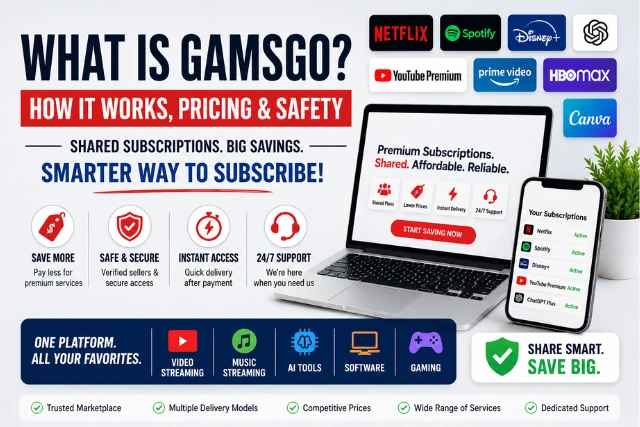
What is GamsGo and how it works? GamsGo is a suscription sharing platform where you can sign up for any subscription, stream, music, AI, software service you want via a shared plan, by itself, or even by having an old account get upgraded. Often the plans are cheaper then what they would cost to purchase directly and the restrictions on how the service will be used are tied to each specific plan.
The Problem GamsGo Is Built Around
The cost of streaming and software subscriptions have quietly become one of the largest recurring bills in a typical month. Netflix now alone ranges from the low $8s on the ad-supported tier up to nearly $25-27 for its Premium 4K plan. Tack on Spotify, Disney+, YouTube Premium and even an AI subscription such as ChatGPT Plus, and it’s easy to approach $80-100 per month for services most users don’t use more than a quarter of the time.
Partial solutions already exist within many of these services themselves: family/multiple profile sharing plans. Many of these services such as Netflix Premium allow multiple profiles under one account. Spotify offers Duo or Family tiers. The catch here however is, the plans are intended for people living under the same roof and gathering together related-strangers to share an account usually involves a lot of coordination, a measure of trust, and finding someone willing to manage the billing. It is this void that GamsGo aims to fill.
So, Exactly What is GamsGo?
GamsGo is a third-party subscription marketplace offering access to a wide range of digital services, including streaming, music, AI, software, and gaming products. Depending on the service, access may be provided through a shared plan, a private subscription, an account upgrade, or another delivery method. Instead of you personally finding other people to split a plan with, GamsGo (or a seller on the platform) handles the sourcing, the account management, and support if something goes wrong.
Its catalog spans a wide range of categories:
- Video streaming – Netflix, Disney+, Amazon Prime Video, HBO Max, Paramount+, Crunchyroll
- Music streaming – Spotify Premium
- YouTube Premium – Including ad-free video and YouTube Music
- AI tools – ChatGPT Plus, Claude, Gemini, and similar
- Productivity and creative software – Canva Pro, Adobe apps, Grammarly
- Gaming – PlayStation Plus, Xbox Game Pass, Nintendo Switch Online
Exactly which delivery model applies shared, private, or upgrade depends on the specific product listing, so it’s worth checking the current product page rather than assuming one model applies across the whole catalog.
How GamsGo Actually Works: The Mechanics
GamsGo works by offering digital subscriptions through different access models, including shared subscriptions, private subscriptions, account upgrades, and third-party marketplace listings. The exact process depends on the product. Before buying, check the listing for access type, duration, region restrictions, device limits, renewal terms, and warranty or refund conditions.
The delivery model depends on the specific product, and it generally falls into one of these categories:
| Access model | How it works | What to check |
| Shared subscription | You receive access to a shared plan alongside other users | Profile, device, and household restrictions |
| Private subscription | You receive a more independent subscription or account | Duration and account ownership |
| Account upgrade | Your existing account receives a premium upgrade | Login requirements and region |
| Marketplace listing | A third-party seller provides the subscription | Seller details, delivery method, and refund terms |
The two most common models in practice are a shared profile/seat on a group plan, and a direct account upgrade.
Shared Profile or Seat
This is a common setup, especially for Netflix-style services. Here’s the general flow:
- An official family, group, or multi-profile plan is purchased directly from the provider.
- That plan’s available seats, for example, several profiles on a Netflix plan get listed individually on GamsGo.
- You buy one seat for a set duration (commonly 1, 3, 6, or 12 months, though this varies by listing).
- You receive login credentials or a private profile invite, along with a dashboard where you can track your subscription.
- You use the service with your own profile, watch history, and recommendations, at whatever tier the underlying plan supports.
Important – Netflix household rules: Netflix’s official rules distinguish between people who live in the same household and people who don’t. Netflix says accounts generally shouldn’t be shared outside the household, although eligible plans can add an extra member. You can review Netflix’s official account-sharing rules before assuming that a shared profile has no restrictions.
You’re not logging into a shared, single profile with strangers on most listings you get your own space within the account. What you don’t get is ownership of the account itself, which matters if the plan is ever cancelled or reorganized.
Account Upgrade
For some products : Spotify listings are a common example. GamsGo can instead upgrade an account you already have, rather than issuing separate login credentials. The exact process depends on the specific product listing: some Spotify products on GamsGo work this way, while others describe a shared-subscription delivery instead. Always check the current instructions on the listing itself before assuming which model applies.
Where an upgrade is used, the general pattern is:
- You provide your account’s email address and a temporary password, as specified on the listing.
- Access is applied to your existing account using the process described for that product.
- You keep your existing data playlists, history, saved content and gain the upgraded features on the account you already had.
Security tip: Never provide your main password unless the current product instructions specifically require it and you’re comfortable with the associated risk. Use a unique password where possible, keep your login credentials confidential, and learn what ExpressVPN is if you want to understand how VPN services can add another layer of privacy when using online services.
Why It’s So Much Cheaper Than Buying Directly?
This is usually the first question people ask once they understand the basic model, and there are really two forces at work.
First, cost-splitting – A Netflix Premium plan that costs roughly $25 a month becomes far cheaper per person once it’s divided across the several profiles it supports. This is the same math behind any official family plan. GamsGo just handles the coordination that most families or friend groups don’t have the patience for.
Second, regional pricing – Digital services often price the same subscription differently by country or region, largely due to differences in local purchasing power and market strategy. Some third-party subscription offers may reflect these regional differences, which can be part of why certain listings look unusually cheap. That said, the exact sourcing and pricing model can vary by product, so this shouldn’t be treated as a universal explanation for every listing. It’s worth checking the individual product page and its regional restrictions before purchasing.
Where regional pricing does play a role, it’s also relevant to the platform’s main practical risk: subscriptions priced or sourced outside a service’s standard local pricing are more likely to eventually get flagged or restricted by the provider. GamsGo generally offers a replacement or account credit if that happens, but it’s a real trade-off worth factoring in rather than assuming savings come with no downside.
What Buying Through GamsGo Actually Looks Like?
Cutting through the marketing, a typical purchase flow looks like this:
- Browse the catalog and pick a service.
- Choose a plan type (shared seat vs. top-up, where applicable) and a duration, longer terms bring the monthly cost down further.
- Apply a promo code if you have one.
- Pay through the platform’s checkout.
- Receive credentials or complete the top-up, usually within minutes to a couple of days depending on stock and service.
- Log in and confirm the upgrade ad-free playback, higher resolution, or whichever feature signals it worked.
There’s no long-term contract in the typical case. You’re paying for a fixed period, and renewal terms depend on the listing, confirming whether it renews automatically before you buy.
Before You Buy a GamsGo Subscription
Because delivery models, restrictions, and pricing vary by product, it’s worth checking these details on the specific listing before purchasing:
- Access type – Shared profile, private account, account upgrade, or another method
- Subscription duration – Confirm the exact start and end dates
- Region restrictions – Check whether the service works in your country
- Device limits – Review how many devices or users can access the subscription
- Renewal terms – Check whether renewal is automatic or manual
- Replacement/refund policy – Understand what happens if access stops working
- Provider terms – Review the official service’s current account-sharing and usage rules
Taking a few minutes to check these before checkout is the difference between a subscription that works exactly as expected and one that comes with surprises later.
Is GamsGo Legit and Safe to Use?
GamsGo is a third-party marketplace, not the official subscription provider for any service it lists. The terms, account structure, region, duration, and access method can differ from buying directly from the service provider, and they can also differ from one GamsGo listing to another.
A few things worth keeping in mind:
- It’s not an official partner of Netflix, Spotify, or any other service it resells. It operates independently of those providers.
- You’re not necessarily buying a personal, fully-owned account. Depending on the product, you may be buying a seat on a managed plan, a private subscription, or a temporary upgrade applied to your own account.
- It’s not risk-free. Shared or region-based access can occasionally lead to a paused or reassigned subscription if a provider’s system flags it. GamsGo generally offers a replacement or credit in that case, but interruptions do happen.
GamsGo vs. Buying Direct
| Factor | GamsGo | Official Provider |
| Price | Usually lower | Standard pricing |
| Provider relationship | Third party | Direct |
| Account ownership | Depends on product | Usually your own account |
| Access model | Varies by product | Defined by provider |
| Support | GamsGo support | Provider support |
| Sharing restrictions | May apply | Provider’s official rules |
| Risk of access changes | Depends on product | Generally lower |
Is GamsGo Worth It?
That depends on what you’re optimizing for. Depending on the service, plan, region, and subscription duration, GamsGo prices can be substantially lower than official pricing, but the size of that gap and the access model behind it both vary by product, so it’s worth comparing the specific listing against the provider’s direct price rather than assuming a fixed discount across the board.
If your priority is a lower monthly cost and you’re comfortable with the access model a given listing uses, GamsGo can be a reasonable option. If you’d rather have guaranteed full account ownership and the lowest possible chance of any access change, buying directly from the provider or organizing an official family plan yourself is the more conservative choice.
Bottom Line
GamsGo can be an option for users looking to reduce subscription costs, but the value depends on the specific service and access model involved. Before buying, compare the GamsGo offer with the provider’s official price, check the product’s terms and restrictions, and make sure you understand whether you’re purchasing a shared subscription, a private account, or an upgrade to an account you already have. Understanding exactly how a given listing works, not just that it’s cheaper, is the difference between using it with realistic expectations and being surprised later.
Frequently Asked Questions
What is GamsGo in simple terms?
It’s a platform that sells shared access to streaming, music, AI, and software subscriptions at a lower price than buying them individually.
How does GamsGo make subscriptions so cheap?
Mainly by splitting the cost of family/group plans across several users, and in some cases sourcing subscriptions from lower-cost regions.
Do I get my own login with GamsGo?
It depends on the product. Many listings provide a private profile or separate credentials, while some, including certain Spotify products, apply an upgrade directly to your existing account instead. Check the specific listing to confirm.
Is GamsGo affiliated with Netflix or Spotify?
No. It’s an independent third-party reseller, not an official partner of any streaming or software provider.
Can a GamsGo subscription stop working?
Occasionally, if a shared account is flagged or reorganized by the provider. GamsGo typically offers a replacement or credit if that happens.
Is there a contract with GamsGo?
No. You pay for a set duration – 1, 3, 6, or 12 months and renewal is entirely optional.